


Welcome to our guide on How to Increase Module Capacity in The First Descendant. In this quick guide, we’ll explain the different methods for increasing your Max Module Capacity as high as possible. You’ll need to utilize all of the methods available to get your module capacity to the highest level possible.
Increasing your Module Capacity is vital for any of The First Descendant Builds. We also have a list for all The First Descendant Modules, where you can view all the available modules.
What Is Module Capacity and Why Should I Increase It?
There are actually two types of Module Capacity in The First Descendant. These are closely related but serve different purposes:
- Descendant Module Capacity – Determines how many Descendant Modules you can apply to your character. Note that more powerful modules typically have a higher cost.
- Weapon Module Capacity – These work in the same way, but are instead applied to your weapons. Each equipped weapon type can be outfitted with a set of modules to customise the weapon’s stats and functionality.
Module Capacity is a balancing feature to prevent players from simply equipping the most powerful modules in the game and steamrolling every mission in The First Descendant. It also acts as a progression feature, since at the start of the game your Module Capacity is rather low, but can be substantially increased by playing the game.
We will now explore the different ways in which you can increase your Module Capacity in The First Descendant.
How to Increase Module Capacity in The First Descendant
Below are the currently available methods for increasing your Module Capacity in The First Descendant:
Increase your Mastery Rank
The most significant increase in Module Capacity comes from upgrading your Mastery Rank. This is a progression process separate from your main character level that needs to be done for each character.
The best way to improve your Mastery Rank is to complete Missions and Quests – for more information about this, please see our detailed The First Descendant Mastery Ranks guide.
By reaching Mastery Rank 20, you can increase your base Module Capacity for both Descendant and Weapon Modules from 25 to 50.
Equip a Sub Attack Module
Please note that this method only applies to Descendant Modules. You should make sure to equip a Sub Attack Module in the Sub Attack Slot on all of your Builds in The First Descendant. Examples of these Modules include Shortsword and Dual Claw. These modules change the form of your Sub Attack action, but more importantly, they give you an extra boost to your Module Capacity. When levelling your Descendant, we recommend always using the Sub Attack Module that grants the highest Module Capacity increase, regardless of which Sub Attack the module grants.
Use Research Requests
You can increase your Module Capacity further by completing Research Requests. Follow the method below to improve your Module Capacity with Research Requests:
- Visit Anais in Albion (the home base/ hub area in TFD)
- Complete Research Requests to gain rewards – specifically, we are looking for the recipe for Energy Activators.
- Craft Energy Activators, also by visiting Anais
- Open your Modules menu
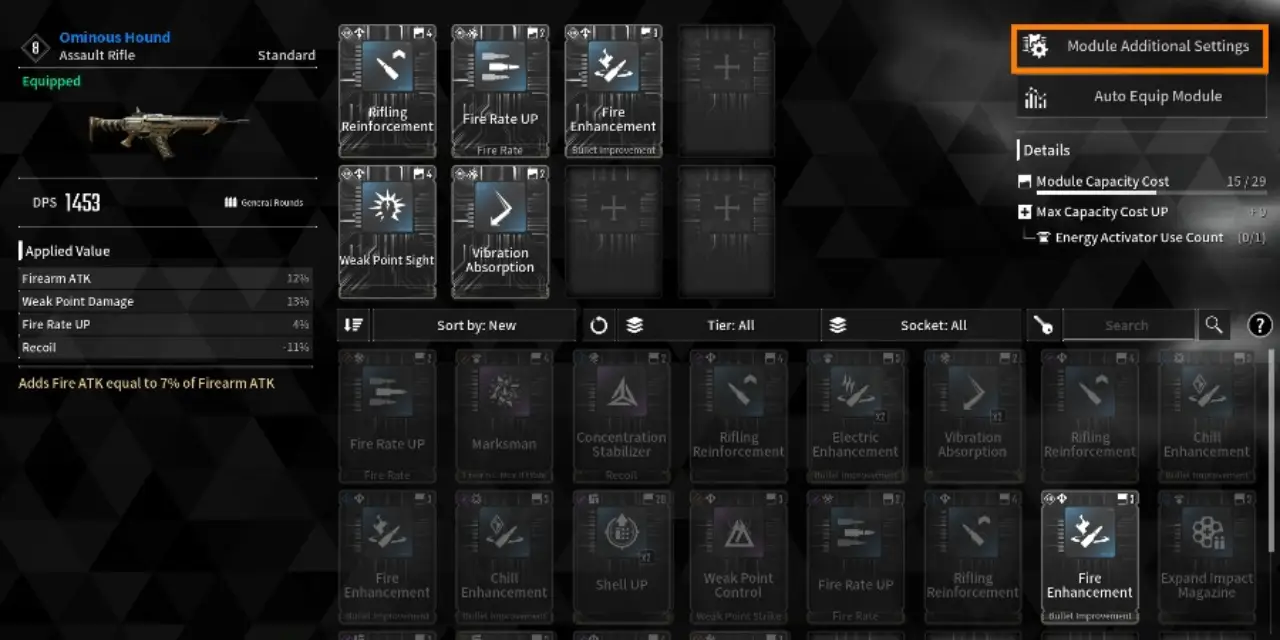
- Go to Module Additional Settings, then select the Increase Max Capacity option, which will consume Energy Activators.
Equip Modules in the Matching Slot
This method doesn’t technically give you more capacity, but it does allow you to make much more efficient use of the Module Capacity you have available. Each Module has a Socket Type attribute, and you have different Socket Types available in your Modules menu.
You should always aim to slot modules in a matching socket. If you do this, the base cost of the Module will be halved. If you slot a Module in the wrong slot type, the base cost is instead doubled.
We hope you liked this guide about Module Capacity in The First Descendant.
Related Content: